See what your processes — and your AI agents — are doing.
Vigil is a native macOS monitor that watches your processes, file activity, and AI tools, learns what “normal” looks like, and surfaces anything unusual. Think of it as a behavioral antivirus — it doesn’t block anything, it tells you what’s happening so you can decide.
Requires macOS 14 (Sonoma) or later
Why Vigil?
Activity Monitor tells you CPU and memory. It doesn’t tell you whether a process is behaving normally, whether something unexpected appeared — or what the AI agents on your Mac are configured to do. Coding assistants with shell access, MCP servers with tool definitions you’ve never read, scheduled agents that run while you sleep: that’s a real and growing attack surface, and almost none of it is visible by default. Vigil fills that gap.
No kernel extensions, no elevated privileges. Vigil uses the same system APIs available to any app on your Mac.
Two ways to look
Glance mode is where new users start: a physics-based orb field where each AI tool is a glowing orb — riskier tools orbit closer to the center — with MCP servers as tethered satellites. A status banner summarizes your security posture in one plain-English sentence, and action cards surface the top risk signals with what happened, why it matters, and what to do. Click any orb for an explanation of the tool behind it.
Advanced mode is the full fourteen-view sidebar for people who want the details, organized into System, AI Activity, and AI Security sections.
AI Security
Vigil uses a protocol-based adapter architecture covering 19 AI tools — Claude Code, Claude Desktop, Codex CLI, Cursor, Copilot, Windsurf, Aider, Cline/Roo, Zed, Gemini and Gemini CLI, ChatGPT, Ollama, LM Studio, llama.cpp, MLX, Hugging Face, Whisper, and Stable Diffusion. Each adapter knows how to detect its tool, read its configuration, parse its sessions, and apply risk rules.
Capability Ledger
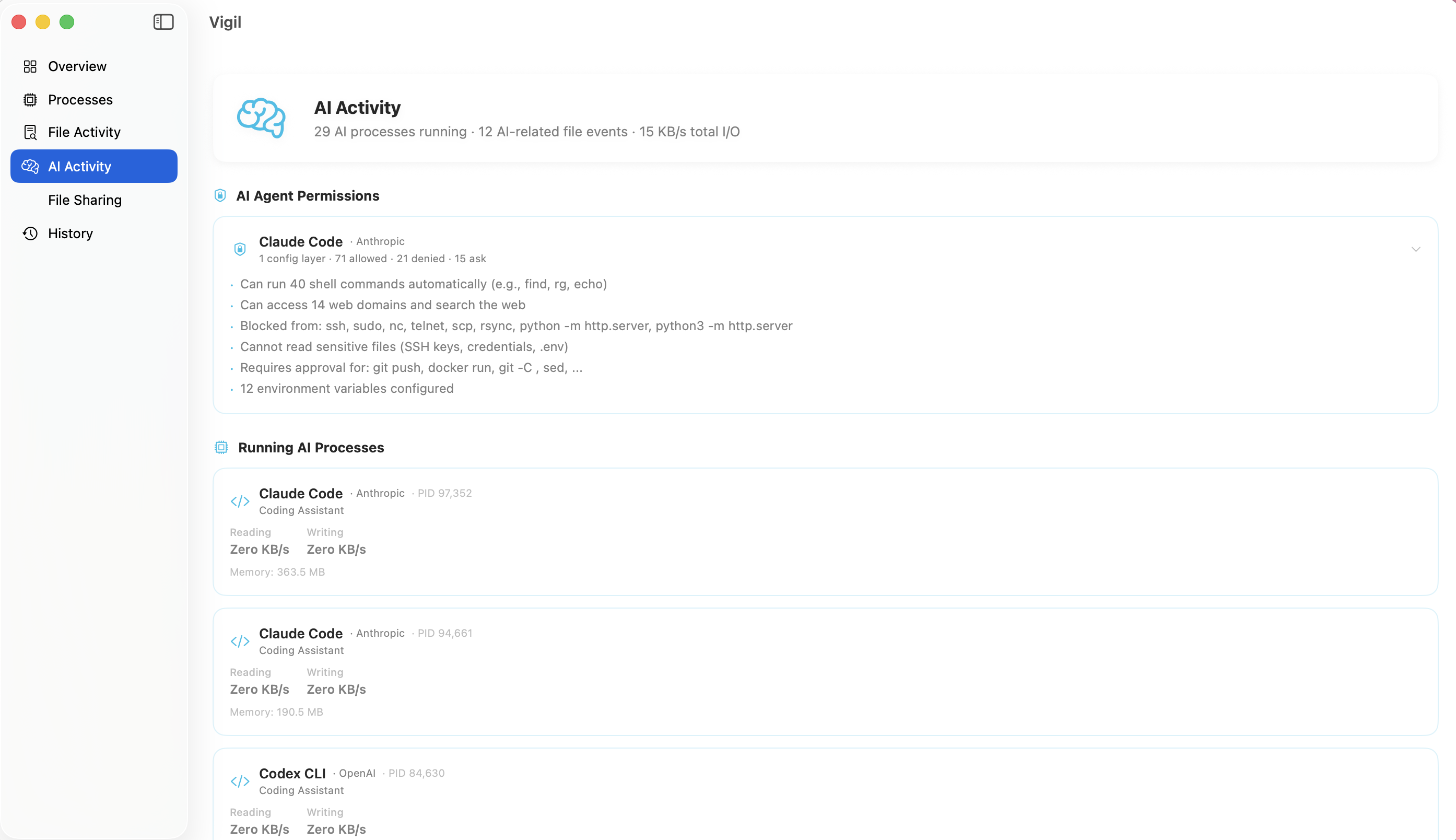
Every principal that can act on your Mac — AI tools, MCP servers, scheduled tasks, cron jobs — with its file scope, shell and network access, browser domains, schedule, and approval mode, in one unified view.
Risk Signals
Detections across 16 categories: sensitive file access, suspicious commands, exfiltration patterns, excessive agency, MCP threats, unattended agents, and more — each with an explanation and remediation.
MCP & Rules
Every MCP server across every tool, grouped by the tool that configured it, with usage statistics from real session logs, risk badges, and prompt surface files (CLAUDE.md, AGENTS.md, .cursorrules).
Permissions Matrix
A grid of each AI tool's capabilities — shell access, file write, network, MCP, hooks, auto-approval — combined with macOS privacy grants like Full Disk Access and Screen Recording.
MCP threat detection
The Model Context Protocol is how AI tools get capabilities, and it’s a genuinely new attack surface. Vigil’s risk engine detects:
- Tool shadowing — duplicate MCP server names across tools, where one instance can impersonate another
- Dangerous tool combinations — read + send, query + publish available across different servers in the same session
- Cross-server data flow — sessions where data moves from a sensitive server to an external one
- Tool description injection — prompt-injection patterns hiding in tool descriptions your agent reads and trusts
- Config drift — MCP servers and permissions that changed between scans
- Supply chain signals — unpinned packages, sensitive environment variables, auto-approved tools
Unattended agents
Vigil discovers agents configured to act with no human present: scheduled agent tasks (with their cron expressions, folder grants, browser domain allowlists, and last-run times) and crontab entries that invoke AI CLIs headlessly on pre-approved permissions. Agents that can modify their own schedules, install packages, or drive a browser unattended are flagged specifically.
Session visibility
The Agent Timeline shows AI sessions chronologically across all tools with expandable command, file, model, and token details. AI Logs browses raw Claude Code session logs. The AI Overview rolls everything up into a risk posture score.
System Monitoring
Vigil’s original foundation is still here and still running:
Overview
A system health score (0-100) with top concerns, process breakdown by category, and file activity summary — all at a glance.
Processes
Detailed process list with memory, disk I/O rates, categories, and descriptions. A knowledge database of ~572 known macOS processes helps identify what's what.
File Activity
Real-time file system event stream showing files being created, modified, deleted, and renamed across your system.
File Sharing
Cloud sync (Dropbox, OneDrive, iCloud, Google Drive), backup, and file transfer activity in one dedicated view.
Behavioral Heuristics
Six automated heuristics run against live process data:
- Unknown high I/O — flags unrecognized processes doing more than 1 MB/s of disk I/O
- Missing system processes — alerts if essential processes (launchd, WindowServer, Dock, Finder) aren’t running
- Lifetime violations — catches transient processes that have been running suspiciously long
- I/O anomalies — detects known processes significantly exceeding their historical baseline
- High energy consumers — identifies any single process using more than 50% of total energy
- Phantom processes — surfaces processes with no verifiable executable path
History and Baselines
Vigil stores daily I/O aggregates per process in a local SQLite database and computes behavioral baselines using Welford’s online algorithm. The History tab compares process behavior across time windows (7-day, 30-day, 90-day, 365-day) so you can see trends and spot drift.
Menu Bar
Vigil lives in your menu bar with a persistent health score and quick access to current findings without opening the full app.
What Vigil can’t see
Vigil’s Capability Ledger includes a visibility map that names its own blind spots — because pretending one app sees everything is how blind spots stay dangerous. Vigil can’t see sensitive data pasted into AI chat in a browser (Prism watches HTTP traffic), the content of network egress (Tapped watches the network), or enforce anything (Harden handles hardening). Full visibility is a combination of tools; Vigil shows you the map.
Technical Details
- Native macOS app built with Swift and SwiftUI, with SpriteKit powering Glance mode
- Apple system frameworks plus a single third-party dependency: Sparkle, for auto-updates
libprocfor process enumeration and resource usage snapshotsFSEventsfor real-time file system monitoring- SQLite (via the C API) for behavioral baselines, AI sessions, risk signals, and MCP server inventory
- Privacy-respecting — all monitoring data stays on your machine; no analytics; the only network request is the Sparkle update check